
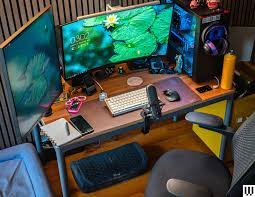
Working from home sounds simple. You grab your laptop and sit on the couch. But after a few days, your back hurts. Your focus drops. Your space feels messy. That is when you realize something important. You need a proper remote work setup.
A good workspace at home is not just about looks. It affects your health, focus, and mood. When your space feels organized and comfortable, your work becomes easier. You feel more in control of your day.
I learned this the hard way. At first, I worked from my kitchen table. After two weeks, I had neck pain and low energy. Once I improved my remote work setup, my productivity changed overnight.
In this complete guide, you will learn how to create a space that supports your body and your goals. Let’s build your ideal home office step by step.
Why a Proper Remote Work Setup Matters
Many people think any table will do. That is not true. Your body needs support. Your mind needs focus. A thoughtful remote work setup improves both.
When your chair supports your back, you avoid pain. When your screen sits at eye level, you reduce neck strain. Small changes make a big difference over time.
A good workspace also reduces distractions. If your desk is clean and organized, your brain feels calmer. This helps you complete tasks faster.
Studies show that environment impacts productivity. Light, posture, and noise all affect performance. So investing in your workspace is really investing in yourself.
Think of it this way. Athletes train with proper equipment. Remote workers should too.
Choosing the Right Location in Your Home
Not everyone has a spare room for an office. That is okay. You just need a quiet corner with good lighting.
Look for a space with natural light. Sunlight improves mood and energy. If possible, place your desk near a window. Avoid working in dark areas.
Your remote work setup should be separate from relaxation spaces if you can. Try not to work from your bed. Your brain connects the bed with sleep.
If space is limited, use a room divider. Even a small shelf can create a boundary. This tells your mind it is time to focus.
Choose a spot with fewer distractions. Avoid high-traffic areas like near the TV.
The Perfect Desk for Comfort and Focus
Your desk is the base of your remote work setup. It should match your height and work style.
When sitting, your elbows should rest at a 90-degree angle. Your wrists should stay straight while typing. This prevents strain.
If possible, consider a sit-stand desk. Alternating between sitting and standing helps circulation. It also reduces back pain.
Make sure your desk has enough surface space. You need room for your laptop, monitor, keyboard, and maybe a notebook.
Avoid clutter. A clean desk improves mental clarity. Keep only essentials within reach.
Even a simple desk can work well if positioned correctly.
Investing in an Ergonomic Chair
A good chair is not a luxury. It is a necessity. Your chair supports your spine for hours each day.
Look for adjustable height and lumbar support. Your feet should rest flat on the floor. Your knees should form a 90-degree angle.
When I upgraded my chair, my back pain improved within days. That change alone transformed my remote work setup.
Avoid dining chairs for long-term use. They lack proper support. Over time, poor seating can cause serious discomfort.
If budget is tight, add a lumbar cushion. Even small improvements help.
Your body deserves care. Comfort equals productivity.
Monitor Placement and Eye-Level Positioning
Screen position matters more than most people realize. Poor monitor height leads to neck strain.
The top of your screen should be at or slightly below eye level. Your eyes should look slightly downward.
Keep the monitor about an arm’s length away. This reduces eye fatigue. If you use a laptop, consider a stand.
In my own remote work setup, adding a laptop stand improved posture instantly. I no longer leaned forward.
If you use two monitors, place them side by side. Align them evenly to avoid twisting your neck.
Proper alignment protects your eyes and spine long term.
Lighting: Natural and Artificial Balance
Lighting affects mood and energy. A dark space feels heavy. Bright, balanced light keeps you alert.
Natural light is best. It reduces eye strain and improves focus. Position your desk to avoid glare on your screen.
If natural light is limited, use a desk lamp. Choose soft white light. Avoid harsh blue tones at night.
Your remote work setup should feel bright but comfortable. Overhead lights alone are not enough.
I recommend layering light sources. Combine a ceiling light with a desk lamp.
Good lighting keeps you energized throughout the day.
Keyboard, Mouse, and Accessories
Your hands do a lot of work daily. Proper accessories reduce strain.
Use an external keyboard and mouse if you work on a laptop. This improves wrist position.
Keep wrists straight while typing. Avoid bending them upward.
Consider a wrist rest if needed. It supports comfort during long tasks.
Noise-canceling headphones are helpful in shared spaces. They reduce distractions.
Small upgrades make your remote work setup more efficient and comfortable.
Technology should support your workflow, not slow it down.
Organizing Your Workspace for Productivity
Clutter steals attention. A tidy desk helps your brain focus.
Use drawer organizers for cables and supplies. Label items clearly. Keep only daily essentials visible.
Add shelves for books or decor. Vertical storage saves space.
I like keeping one plant on my desk. It adds freshness and calmness.
Your remote work setup should feel inviting, not overwhelming.
At the end of each day, reset your desk. This prepares you for tomorrow.
Organization builds discipline and clarity.
Internet and Tech Essentials
Strong internet is critical. A slow connection wastes time and creates stress.
Place your router close to your workspace if possible. Or use a wired Ethernet connection for stability.
Keep software updated. Use cloud backups to protect data.
Your remote work setup depends on reliable tools. A second charger is helpful. Backup batteries prevent interruptions.
Invest in quality tools once. It saves money long term.
Technology should feel seamless, not frustrating.
Adding Personal Touches Without Distraction
Your workspace should reflect your personality. But avoid overcrowding.
Add artwork, photos, or a small plant. These improve mood.
Choose calming colors like blue or green. They reduce stress.
Your remote work setup should inspire you. But keep decorations minimal.
Balance is key. Too much decor creates distraction.
Create a space you enjoy entering every morning.
Creating Healthy Work Habits
Even the best setup cannot replace healthy habits.
Take breaks every hour. Stretch and move your body.
Follow the 20-20-20 rule for eye health. Every 20 minutes, look at something 20 feet away for 20 seconds.
Stand up and walk briefly during calls.
Your remote work setup supports you, but habits sustain you.
Consistency leads to long-term comfort.
Budget-Friendly Remote Work Setup Ideas
You do not need expensive furniture.
Use books to raise your laptop. Add cushions for support.
Shop second-hand desks and chairs. Many are affordable and high quality.
DIY cable organizers save money.
My first remote work setup cost very little. I upgraded slowly over time.
Focus on essentials first: chair, desk, lighting.
Small improvements create big results.
FAQs About Remote Work Setup
1. What is the most important part of a remote work setup?
An ergonomic chair and proper desk height are the most important for long-term health.
2. How much space do I need?
Even a small corner works if organized well.
3. Is a standing desk necessary?
Not required, but helpful for reducing sitting time.
4. How can I reduce distractions at home?
Use headphones and set clear boundaries with others.
5. What lighting is best?
Natural light is ideal. Add soft white lamps if needed.
6. How often should I upgrade my setup?
Upgrade when discomfort begins or workflow improves with new tools.
Final Thoughts: Build a Space That Works for You
Your workspace shapes your day. A thoughtful remote work setup supports focus, comfort, and growth.
Start small. Improve step by step. Prioritize your health and productivity.
Remember, your home office is an investment in your future. When you create a space that works for you, everything feels easier.
Take action today. Rearrange your desk. Adjust your chair. Add better lighting.
